%20scale(1.05)%20translate(-12,-14.25)'%3e%3cpath%20d='M12%2021s-7.5-4.7-7.5-10.2A4.3%204.3%200%200%201%2012%207.5a4.3%204.3%200%200%201%207.5%203.3C19.5%2016.3%2012%2021%2012%2021Z'%20fill='%23F0384A'%3e%3c/path%3e%3c/g%3e%3c/svg%3e)

If a match, like, or profile vanished on Hinge, it’s almost always one of three things: they unmatched you, they deleted their account, or the app just needs to re-sync. Start with the quick technical fixes below. If nothing comes back after that, the disappearance is likely permanent, and no amount of refreshing will fix it.
TL;DR:
- Most disappearing matches on Hinge result from app glitches, account deletions, or unmatching, with technical issues often resolving within hours.
- When a single match or like disappears, it usually indicates the other person unmatched you, deleted their account, or faced a profile removal for violating guidelines.
- Inactive or hidden chats can be recovered by checking the Hidden Chats section and re-engaging to keep conversations active in the app.
- Permanent removal of matches occurs with unmatching, account deletion, or bans, which are not reversible or detectable from your side.
- To prevent future disappearances, keep the app updated, maintain consistent login methods, follow community guidelines, and avoid long silence in conversations.
Why Did My Hinge Profile Disappear? First Things to Check
Before you panic, rule out the boring explanation. Most disappearing-match scares come down to a glitchy app, not a guilty partner.
- Check your connection. Switch from Wi-Fi to cellular data (or vice versa) and reopen Hinge. A weak signal can stop matches from loading even though they still exist.
- Force-close and reopen the app. Give it a full minute to re-sync with Hinge’s servers before you assume anything is gone.
- Log out, then log back in. This forces a fresh pull of your data straight from Hinge’s servers, not your phone’s memory.
- Restart your phone. Sounds simple, but it clears out background app glitches that a force-close won’t touch.
- Update the app. Check the App Store or Google Play for a pending update. If you just updated and things broke, the issue is often on Hinge’s end and clears up within a day.
- Reinstall Hinge if needed. Your matches and messages live on Hinge’s servers, not on your device, so reinstalling won’t erase anything real.
- Confirm your login method. If you normally sign in with your phone number but Hinge tries to log you in with Apple or Google, you’ll land on what looks like an empty account.
According to Hinge’s own support guidance, when all your matches vanish at once, this is usually a temporary syncing issue, not a mass unmatching event. If only one or two matches disappeared while the rest stayed put, skip ahead. That’s a different story entirely.
Why Would One Match or Like Disappear on Its Own?
When it’s just one match or one like missing, and everything else in your account looks normal, the cause is almost always something the other person did.
- They unmatched you. This wipes the conversation from both sides instantly, with zero notification sent to you.
- They deleted their Hinge account. Hinge confirms that when a like disappears, it usually means the person who liked you deleted their profile entirely.
- Hinge removed their profile. Violating the platform’s Terms of Service, fake photos, harassment reports, or spam behavior can get an account pulled by Hinge itself.
- Only their content got flagged. Sometimes Hinge removes a specific photo or prompt for a guidelines violation while leaving the rest of the profile active, so the match stays but their profile looks different.
Here’s the frustrating part: from your side, unmatching and account deletion look identical. There’s no label that says “he blocked you” versus “he deleted his account.” One missing match with the rest of your list untouched points to a personal decision on their end, not a bug. Many matches gone all at once points back to the tech issue covered above.
What Happens to Hidden or Inactive Chats?
A match that goes quiet for a while doesn’t always disappear. Hinge can tuck low-activity conversations into a Hidden Chats folder so your main list stays focused on newer matches.
- Open the Matches tab and scroll to the bottom of your active list.
- Look for a Hidden Chats or Requests section, often collapsed under a small arrow or “See More” link.
- Tap into it to check whether the missing match is sitting there, untouched.
- Send a message or react to something to pull that conversation back into your main feed.
Chats tend to get buried after a stretch of no replies from either side. If you keep the conversation active, even with a short message once in a while, Hinge keeps it visible instead of quietly filing it away.
Can a Disappeared Match Be Restored?
Some disappearances are fixable. Others are final, and it helps to know which category you’re dealing with before you waste time hoping.
- Unmatching cannot be undone. Hinge’s own policy on unmatching states support staff are unable to restore a conversation once someone unmatches, no exceptions.
- Account deletion is also final for your view of the match. If they create a new account later, you’d only reconnect if Hinge’s algorithm shows you their new profile.
- Technical glitches usually resolve on their own. If matches vanished during an outage or update, they typically reappear once the app re-syncs, often within hours.
Pro Tip: If your match count drops but your message history for other chats stays intact, that’s a strong sign it’s a sync issue, not a deletion. Full account wipes tend to affect everything at once, not just one thread.
When Should You Contact Hinge Support?
Only reach out after you’ve run through the fixes above and given the app a little time to catch up. Contacting support too early just gets you a canned “try restarting your app” reply.
- Wait at least a few hours after trying the technical fixes, since server-side syncing isn’t instant.
- Open a support ticket through the app or Hinge’s help center.
- Include your username, phone model, and operating system version.
- Attach a screenshot showing the missing match or your empty matches list.
- Note the exact time you noticed the problem.
- List every fix you already tried, so they don’t waste your time repeating steps.
Expect a reply within a day or two. While you wait, keep the app updated and avoid reinstalling repeatedly, since that won’t speed anything up.
How Do Bans or Suspensions Affect What You See?
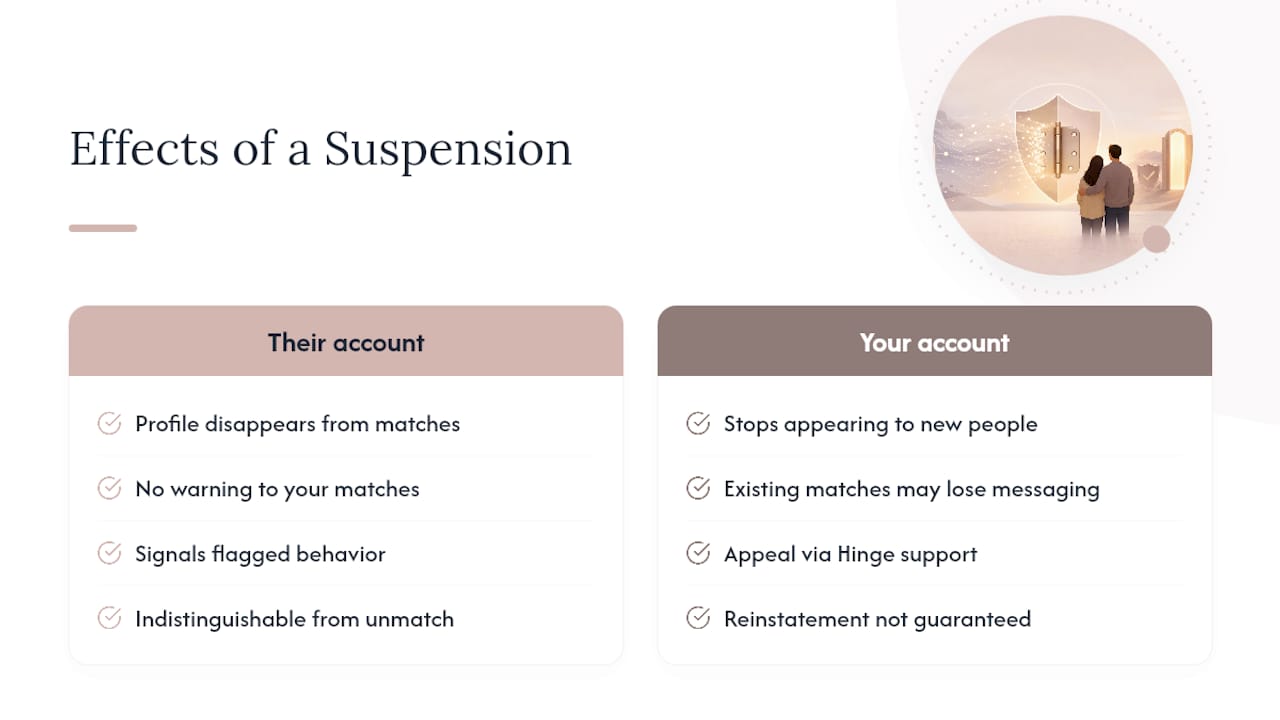
If Hinge suspends or bans an account for violating its Terms of Service, that profile disappears from every match list connected to it, including yours. There’s no warning sent to the people who matched with that person. One day the conversation is there, the next it’s simply gone, indistinguishable from a voluntary unmatch or deletion from your side of the screen.
Common triggers for a ban include harassment reports, fake or stolen photos, off-platform solicitation, underage use, or repeated violations of Hinge’s community guidelines. Hinge doesn’t publish exact thresholds for how many reports trigger a suspension, and it doesn’t notify matches when it happens.
This matters for a specific reason: if your match got banned, it says nothing about you or the conversation. It says something about behavior Hinge already flagged. If you’re trying to figure out whether someone got banned versus unmatched you on purpose, there’s genuinely no way to tell from your side. Both look like a match that quietly vanished with no explanation.
If your own account gets suspended, your profile stops appearing to new people, and your existing matches may lose the ability to message you depending on the violation. Appeals go through Hinge’s support channel directly, and reinstatement isn’t guaranteed.
How Can You Prevent a Profile From Disappearing Again?
A few habits cut down on both technical glitches and accidental account issues going forward.
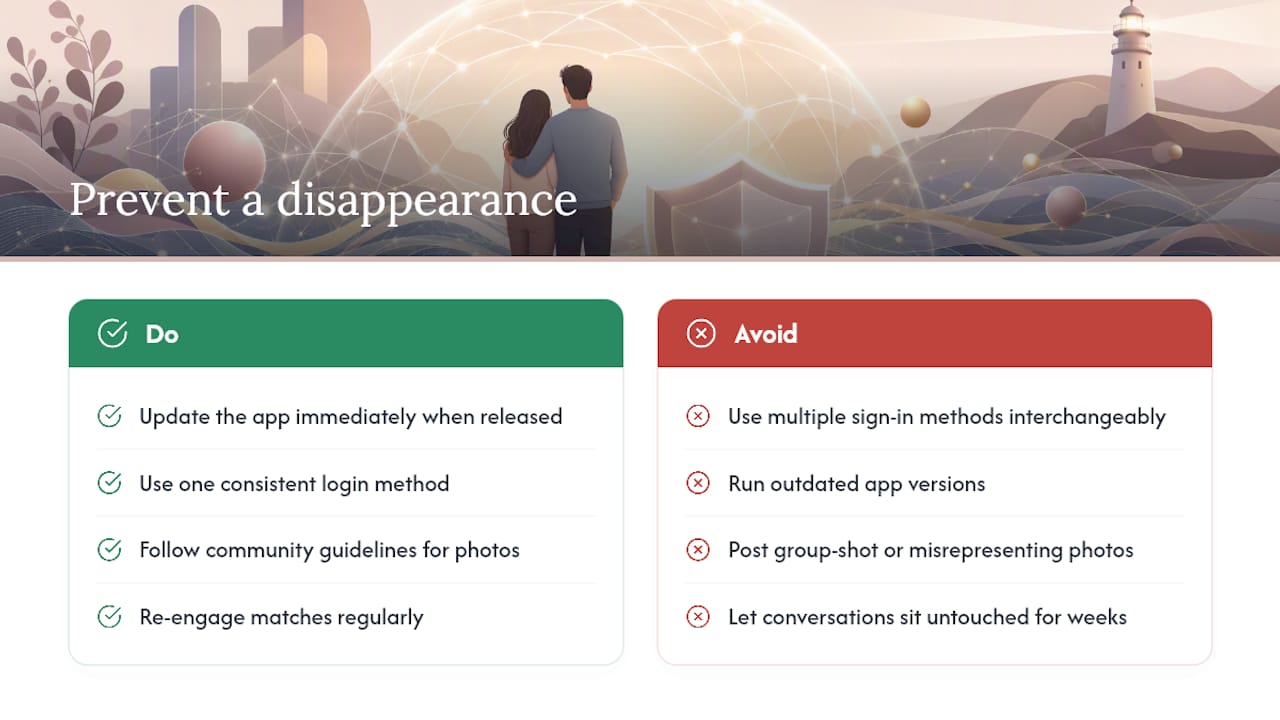
Keep the app updated the moment a new version drops. Outdated versions are more prone to sync failures, and Hinge often patches known bugs quickly after a rocky rollout.
Use one consistent login method. If you signed up with your phone number, stick with it rather than switching to Apple or Google sign-in later, since that mismatch is a common reason people think their whole account vanished.
Follow Hinge’s community guidelines closely, particularly around photos (no group shots as your main photo, no filters that misrepresent your appearance) and messaging behavior. Reports pile up fast, and repeated flags are what typically lead to a suspension.
Re-engage with matches instead of letting conversations sit untouched for weeks. Beyond avoiding the hidden-chats folder, active conversations are simply less likely to get lost in an app glitch since they’re refreshed every time you open the thread.
Back up context outside the app when it matters. Screenshotting a conversation the moment it feels significant means you’re not left with nothing if a match or account disappears later.
A Calm Path Forward if You’re Unsure
Watching a match or a profile vanish overnight is unsettling, especially if you already had doubts about someone. Not knowing what happened, whether they blocked you, deleted their account, or got banned, eats at you far more than most people admit.
Here’s what you need to hear clearly: installing spyware, tracking apps, or reading someone else’s messages without permission is illegal in most places, and it can get you prosecuted, not them. That risk isn’t worth it, no matter how anxious you feel right now.
Cheater Detector AI checks only publicly visible dating profiles across major apps. No phone access, no spying, no installed software on anyone’s device. Every report is encrypted and built to give you a straight answer.
If you suspect he or she is active on dating apps behind your back, search their name now instead of guessing.
— Oleg
Cheater Detector AI: A Private Way to Check if They’re Still Active
Wondering whether that vanished match means he’s active on dating apps again, or whether she never really deleted her profile at all, is its own kind of exhausting. Cheater Detector AI was built for exactly this moment: a fast way to check without touching anyone’s phone.
The Deep Person Scan cross-references the minimal details you provide against active profiles on major dating platforms. If a match comes back, you get profile photos, matching details, and activity timestamps in an encrypted report sent straight to you, with no notification ever sent to them. Ongoing monitoring alerts you if a new profile pops up later, so you’re not left wondering again in three months.
Everything runs on publicly available profile data. No phone access, no installed apps, no gray-area tactics that could come back on you. Just a straightforward, anonymous scan built for people who need clarity.
Start your Deep Person Scan today and get your answer without ever picking up their phone. Still unsure if he or she is even active on dating apps at all? Check their profile now and find out anonymously, in minutes.
Sources
FAQ
Why Did Someone’s Profile Disappear on Hinge?
They likely unmatched you, deleted their Hinge account, or Hinge removed their profile for a Terms of Service violation. If it happened to all your matches at once, it’s more likely a temporary sync glitch on Hinge’s end.
Why Did My Hinge Account Disappear?
If your own profile vanished, check whether you’re logged in with the correct method (phone versus Apple or Google sign-in), since that mismatch often looks like a missing account. A suspension for a guidelines violation can also remove your visibility to others.
How Do I Know if Someone Deleted Their Hinge or Unmatched Me?
You genuinely can’t tell the difference from your side. Both actions remove the conversation permanently with no notification sent to you.
Why Was My Hinge Account Removed?
Hinge removes accounts for Terms of Service violations, including fake photos, harassment reports, or repeated community guideline breaches. You can appeal through Hinge’s support channel, though reinstatement isn’t guaranteed.
Can I Get a Disappeared Hinge Match Back?
Not if it happened because of unmatching or account deletion. If your match count dropped due to a syncing problem or outage, logging out and back in or reinstalling the app usually brings it back within a day.