%20scale(1.05)%20translate(-12,-14.25)'%3e%3cpath%20d='M12%2021s-7.5-4.7-7.5-10.2A4.3%204.3%200%200%201%2012%207.5a4.3%204.3%200%200%201%207.5%203.3C19.5%2016.3%2012%2021%2012%2021Z'%20fill='%23F0384A'%3e%3c/path%3e%3c/g%3e%3c/svg%3e)

You saw it. A green dot. “Active Now.” Your stomach dropped.
Before your mind races to the worst conclusion, here’s the truth: Online Now means your partner opened Tinder within the last two hours. “Recently Active” means they used the app within the last 24 hours. Neither label proves they were messaging someone, swiping, or doing anything specific. They’re directional signals, not surveillance footage.
Here’s what those labels actually show at a glance:
- “Online Now” = app interaction within a short recent window
- “Recently Active” / green dot = app opened sometime within a recent day
- Both labels are visible to other users by default, but your partner can hide them in privacy settings
- Hiding status also hides other people’s statuses from them
- A missing indicator does not mean they haven’t been on the app
Key Takeaways
Tinder’s activity labels show recent app interaction within defined time windows, but they don’t prove what your partner was doing or who they were talking to.
| Point | Details |
|---|---|
| “Online Now” window | Means app interaction within the last 2 hours; disappears automatically after that. |
| “Recently Active” window | Means the app was opened within the last 24 hours; shown as a green dot. |
| Status can be hidden | Your partner can turn off their activity status, so a missing dot doesn’t mean inactivity. |
| False positives are common | Background refreshes and brief app opens can trigger an “active” status without real intent. |
| CheaterDetectorAI | Scans public dating profiles discreetly, with no phone access required. |
What does “Active Now” on Tinder actually mean?
Tinder uses two separate activity labels, and the difference matters.
“Online Now” is the more urgent-looking one. According to Tinder Help, it appears when a user has interacted with the app within a recent short time frame. It stays visible for a time after that last interaction, then disappears on its own.
“Recently Active” is broader. The Tinder Help page for Recently Active confirms it reflects app use within a recent day. A small green dot appears next to a match’s name or photo to signal this. You’ll see it in Discovery and, if you’re a Gold or Platinum subscriber, in the Likes You grid as well.
Tinder Gold and Platinum subscribers get more visibility into these indicators. The Likes You feature, exclusive to those tiers, can show which profiles carry a Recently Active green dot, giving paying users a clearer picture of who’s been online.
What can actually trigger these statuses:
- Opening the app, even briefly
- Swiping left or right
- Sending or reading a message
- A background refresh triggered by a push notification
That last one is worth pausing on. A push notification from Tinder can cause the app to refresh in the background, which may flip someone’s status to “active” without them ever consciously opening the app. SwipeStats explains that these triggers are broad enough to create false positives regularly.
Key fact: The green dot and “Online Now” label reflect recent app activity within defined time windows. They do not show who your partner was talking to, what they did, or whether they swiped on anyone.
How to see and turn off your own active status on Tinder
You can control whether your status is visible to others by toggling the activity status off in settings. Once you turn it off, other users won’t see your Online Now or Recently Active indicators.
There’s a trade-off, though:
- Turning off your status also removes your ability to see others’ statuses
- You won’t see activity indicators on other profiles once the setting is off
- The change takes effect immediately
Pro Tip: If you’re checking whether your partner is active, turning off your own status first prevents them from seeing that you’ve been on the app while you look. Just know you’ll lose visibility into their status at the same time.
How accurate are these indicators — and what don’t they prove?
Honest answer: they’re useful, but far from precise.
The SwipeStats guide on Tinder activity points out that a status can flip from a background refresh or a two-second app open to dismiss a notification. That means “Online Now” doesn’t confirm your partner was actively swiping or chatting. It just means the app registered some form of interaction.
A few scenarios that produce misleading readings:
- Your partner’s phone auto-refreshed Tinder while they were asleep
- They opened the app to check a notification, then closed it immediately
- They have Tinder installed but haven’t actually used it intentionally in days
On the flip side, a missing indicator doesn’t mean they’re innocent. Tinder’s settings allow users to hide their status entirely, so absence of a green dot can simply mean they turned it off.
A word of caution: Installing spyware, reading your partner’s messages without permission, or accessing their accounts without consent can get you prosecuted. No suspicion is worth that.
For more context on Tinder’s read receipts and last-active behaviors, the signals work similarly across the app’s messaging features.
Practical signs that suggest someone is active on Tinder right now
You can look for a few signals without snooping.
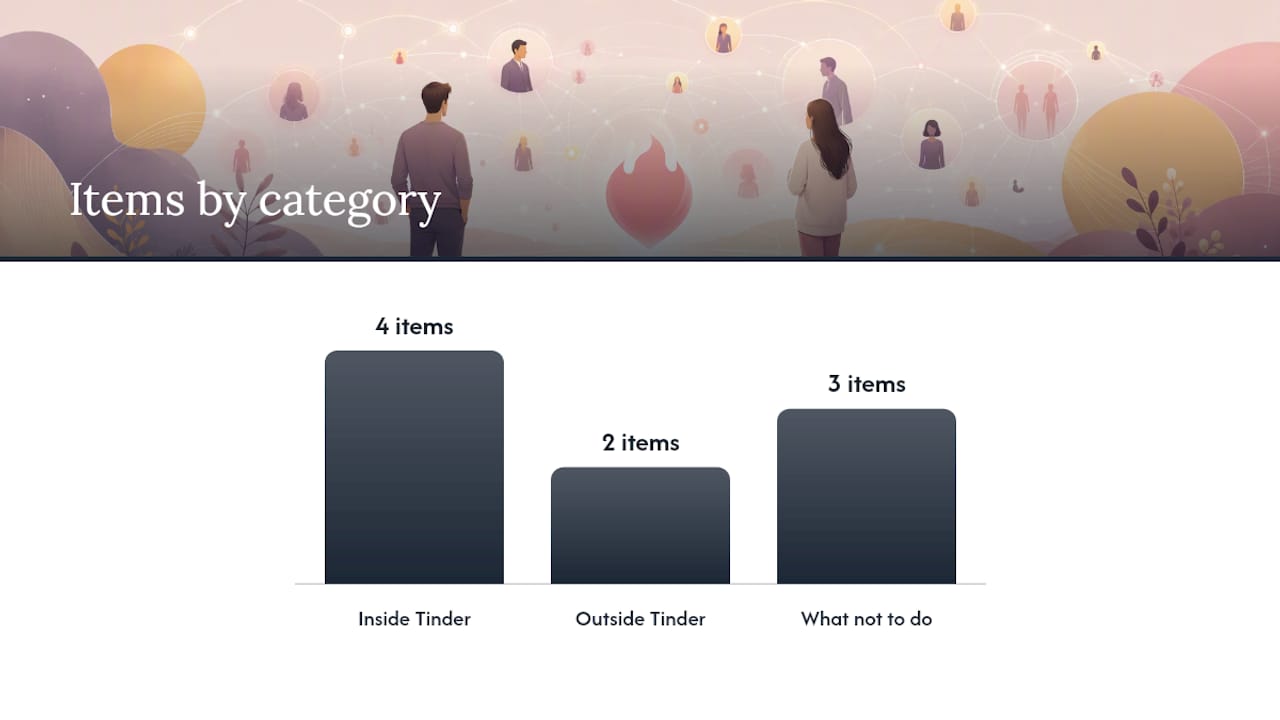
Inside Tinder:
- The “Online Now” label appears on their profile card in Discovery
- A green dot shows next to their name in your match list
- Their profile photo or bio has changed recently (a profile update requires logging in)
- If you’re a Gold or Platinum subscriber, check the Likes You grid for green dots
Outside Tinder:
- If they’ve linked an Instagram account to their Tinder profile, recent public posts can confirm recent activity outside the app
- New activity on other public social accounts around the same time as a Tinder status can add context
What not to do:
- Don’t install tracking apps or spyware on their phone
- Don’t try to log into their Tinder account
- Don’t read their messages, even if their phone is unlocked in front of you
Pro Tip: Check the status, note the time, then step away from the phone. Emotional decisions made while staring at a green dot rarely lead anywhere good. Give yourself 20 minutes before deciding on a next step.
Checking if someone has Tinder through public methods is always the safer starting point.
What to do if you’re genuinely concerned about your partner’s Tinder activity
Worry without a plan just eats at you. Here are steps you can actually take.
Things you can do right now:
- Screenshot any public information you can see (profile cards in Discovery, linked social posts)
- Check publicly linked social accounts for recent activity
- Use a discreet profile search service like CheaterDetectorAI, which scans publicly available dating profiles without accessing anyone’s phone or private accounts
- Have a direct conversation with your partner
One clear line: Spying on someone’s phone, installing tracking software, or reading their private messages without consent is a federal crime under the Computer Fraud and Abuse Act and various state wiretapping statutes. You can face criminal prosecution and civil liability. Stick to public information.
If you want to escalate beyond an initial check:
- Document public evidence carefully with dates and screenshots
- Consider speaking with a relationship counselor before confronting your partner
- If the relationship is serious and you believe infidelity is occurring, consult a family attorney about your options
For a full breakdown of what’s legal and what isn’t when checking dating apps, the risks are real and worth understanding before you act.
Why these signals matter more than most people admit
The doubt is exhausting. You check the app, you see a green dot, and suddenly you’re running through every possible explanation. That cycle, the checking and second-guessing, costs you sleep, focus, and peace of mind.

Here’s what I’ve come to believe after thinking through how these systems work: the indicators are real, but they’re not confessions. A green dot tells you the app was opened. It doesn’t tell you why, by whom in what context, or what happened next. Treating it as proof of betrayal before you have more information is a fast path to a confrontation you can’t take back.
The smarter move is measured verification. Check what’s publicly visible. Use a dedicated tool if you need a deeper look. Then make a decision based on actual evidence, not a two-hour activity window that could have been triggered by a push notification.
The cost of not knowing is real. But the cost of acting on incomplete information is often worse.
Cheater Detector AI: a discreet way to check for active dating profiles
Seeing a green dot is one thing. Knowing whether your partner has an active dating profile is another. CheaterDetectorAI scans publicly available profiles across major dating platforms, including Tinder, and returns an encrypted report with profile photos, usernames, and activity timestamps. No phone access. No spyware.

What you get:
- Discreet scan of public dating profiles using only your partner’s name and basic details
- Encrypted report with matches, photos, and timestamps
- No notification sent to your partner at any point
- Fast results so you’re not waiting days for an answer
This service searches only publicly available data. It does not access private messages, accounts, or devices.
Search their name now at CheaterDetectorAI. Check their profile today with a discreet partner scan. If you want a thorough look, run a deep person scan and get a full report fast.
Sources
- Online Now – Tinder
- What Does Active Mean on Tinder? (2026 Guide) | SwipeStats
- How To See If Someone Is Active On Tinder In 2025
FAQ
Does “Active Now” mean they’re on Tinder at this exact moment?
Not necessarily. “Online Now” means the app was interacted with within the last two hours, but the status can persist after the person has already closed the app.
How long does Tinder show “Recently Active”?
Tinder’s Recently Active label reflects app use within the past 24 hours. After that window passes without any interaction, the green dot disappears.
How can I tell if someone has been active on Tinder recently?
Look for the green dot next to their name in your match list or on their profile card in Discovery. If you’re a Gold or Platinum subscriber, the Likes You grid may also show Recently Active indicators. Keep in mind that background refreshes can trigger these labels without intentional use.
Is the “Recently Active” status accurate?
It’s directional, not precise. The label reflects a real app event within 24 hours, but that event could be as minor as a background refresh or a two-second notification check. A missing status may also mean the user turned off their active status in settings, not that they’ve been inactive.