%20scale(1.05)%20translate(-12,-14.25)'%3e%3cpath%20d='M12%2021s-7.5-4.7-7.5-10.2A4.3%204.3%200%200%201%2012%207.5a4.3%204.3%200%200%201%207.5%203.3C19.5%2016.3%2012%2021%2012%2021Z'%20fill='%23F0384A'%3e%3c/path%3e%3c/g%3e%3c/svg%3e)

You saw the green dot. Or maybe you noticed it was gone. Either way, something felt off, and now you’re here. That feeling matters. Here’s the straight answer: Match, Hinge, and Tinder all show approximate activity windows, not live, second-by-second tracking. A dot tells you roughly when someone last opened the app. It does not tell you who they talked to, what they said, or why they were there.
Here’s how each app handles it at a glance:
- Match.com: Four color-coded dot symbols tied to specific time windows (up to 45 minutes, up to 24 hours, up to 72 hours, or gone entirely). Cannot be turned off.
- Hinge: Text labels like “Active Now” or “Active Today.” Users can hide their status, but doing so also hides everyone else’s from them.
- Tinder: A green dot that signals activity within roughly the last 24 hours. Some users can pay to hide it.
Key Takeaways
Match, Hinge, and Tinder activity indicators show approximate time windows only, not real-time presence, and each platform handles visibility and privacy controls differently.
| Point | Details |
|---|---|
| Match’s four dot symbols | Solid green = within 45 min; empty green = up to 24 hrs; empty yellow = up to 72 hrs; no dot = over 72 hrs. |
| Hinge reciprocity rule | Hiding your own status on Hinge also removes your ability to see anyone else’s status. |
| Tinder’s green dot limits | The dot covers roughly 24 hours and can be hidden by users on paid plans. |
| Skip the spyware | Installing tracking apps or reading private messages without consent can backfire on you. |
| CheaterDetectorAI | Scans public dating profiles anonymously, delivering profile matches, photos, and timestamps. |
What Match’s last active symbols actually mean
Match uses four distinct indicators to show a match’s activity status, and each one maps to a specific time window:
| Symbol | What it means |
|---|---|
| Solid green dot | Active within the last 45 minutes |
| Empty green circle | Active within 24 hours |
| Empty yellow circle | Active between 24 and 72 hours ago |
| No dot | Not active in more than 72 hours |
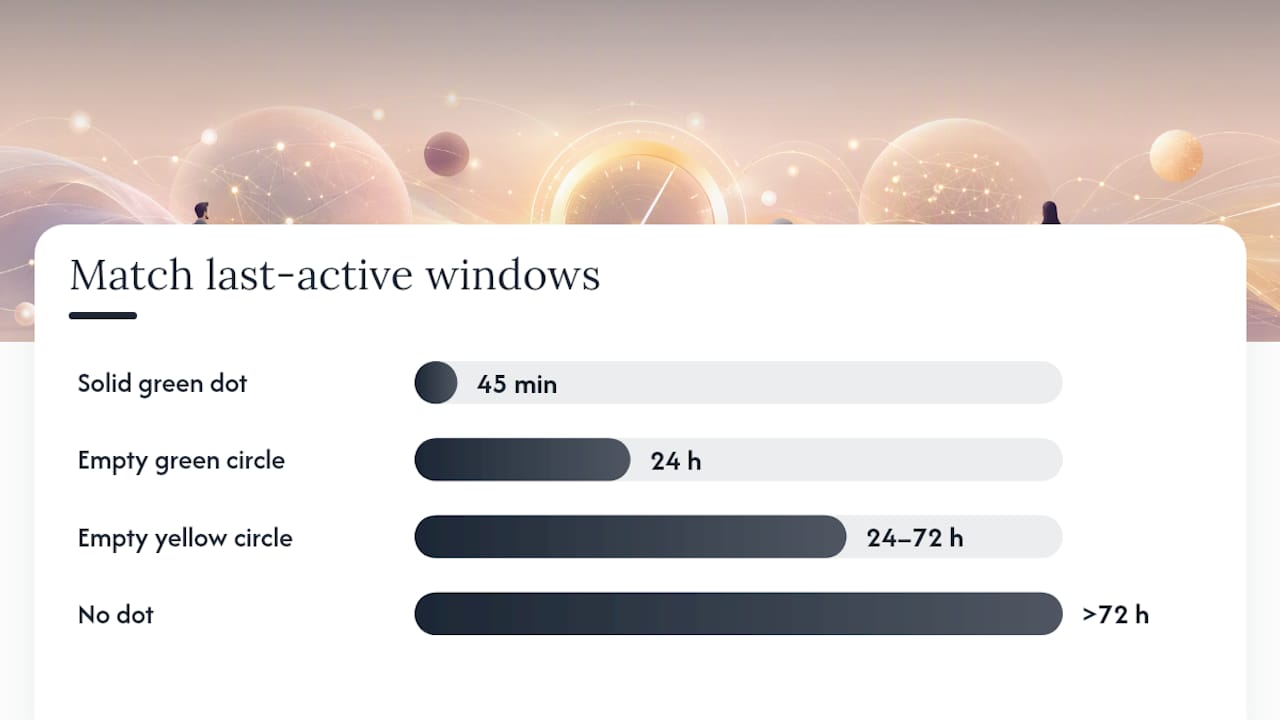
Two things trigger a status update on Match: logging into the app, or opening a Match email notification. That second one trips people up constantly. Your partner’s status could flip to “active within 45 minutes” simply because they tapped a promotional email from Match in their inbox, not because they opened the app to browse profiles.
Match does not give users a way to turn this indicator off. Unlike Hinge or Tinder, there is no privacy toggle. What you see is what the platform shows, period.
Pro Tip: If you see a solid green dot but your partner claims they haven’t been on the app, ask yourself: did they get a Match email today? An email tap updates the status just like a full login.
How Hinge’s “Last Active” labels and toggle work
Hinge keeps it simpler in wording but more nuanced in design. Instead of colored dots, you see text labels: “Active Now” or “Active Today.” Per Hinge’s official help page, these labels are approximate, not precise timestamps.
You can see these labels in three places: Discover, Standouts, and Likes You.
The part most people miss is the toggle. Hinge has a “Show Last Active Status” setting, and it works both ways. Turn yours off and you gain privacy. But you also lose the ability to see anyone else’s status. That’s deliberate. Hinge built it as a reciprocity rule: you can’t hide and still spy.
Here’s how to find the toggle:
- Open Hinge and tap your profile icon.
- Tap Settings.
- Scroll to Privacy.
- Find Show Last Active Status and toggle it on or off.
If your partner’s status has disappeared from their profile, one of two things is true: they turned theirs off (which also means they can’t see yours), or they simply haven’t been active recently enough to trigger a label.
What Tinder’s green dot tells you and what it doesn’t
Tinder’s version is the most familiar. A small green dot next to a profile photo means that person has been recently active, typically within the last 24 hours according to Tinder’s help documentation. No dot means they haven’t opened the app in over a day, or they’ve hidden the indicator.

That last part matters. Independent reporting confirms that Tinder users can pay to limit or hide their activity visibility entirely. So a missing dot is not proof of inactivity. It might just mean your partner paid for a feature that hides it.
A few things to keep in mind about Tinder’s green dot:
- It reflects activity within roughly 24 hours, not the exact minute.
- It is not a live tracker. The app updates it periodically, not in real time.
- Users on paid plans can suppress the dot entirely.
- A dot that disappears and reappears may reflect app caching, not actual login patterns.
Why these activity signals are often wrong
Every one of these indicators has the same core problem: they are built to encourage engagement, not to give you an accurate audit trail. Presence systems like the one Microsoft Teams uses compute status from a mix of app activity, device state, and scheduled timeouts. Dating apps work the same way. The result is a signal that can be wrong in both directions.
Here are the most common reasons you’ll misread a status:
- Email opens: On Match, opening a notification email counts as activity. Your partner may not have touched the app itself.
- App caching and delays: Status doesn’t update the instant someone closes the app. Platforms often wait through an inactivity timeout before flipping a user to offline, which can leave “Active Now” showing for minutes after someone has left.
- Multi-device activity: Someone might open the app on a tablet they forgot about, updating their status without intending to.
- Privacy toggles: As covered above, both Hinge and Tinder let users hide their status. A blank indicator is not the same as no activity.
- Paid features: Tinder’s paid tiers can suppress the green dot entirely.
- App design incentives: These dots exist to make the app feel lively and keep you swiping. They are engagement tools, not surveillance logs.
If you’re building a case on a colored circle, you’re building on sand.
How to control your own last-active visibility on each app
You have more control than you might think. Here’s exactly where to find the settings:
Match:
- Open Match and go to your profile.
- Tap Settings.
- Look under Privacy or Account Settings.
- Note: Match does not offer a toggle to hide your activity status. It is always visible to your matches.
Hinge:
- Open Hinge and tap your profile icon.
- Go to Settings, then Privacy.
- Toggle Show Last Active Status off to hide yours (and lose visibility of others’).
Tinder:
- Open Tinder and tap your profile icon.
- Go to Settings.
- Scroll to Show Activity Status and toggle it off.
- Note: Hiding your status on Tinder may require a paid subscription tier depending on your account.
Pro Tip: If you want to quietly check whether your partner is active without them seeing your own status, Hinge’s toggle is a trap — turning yours off removes theirs from view too. On Tinder, you can hide your own dot, but that won’t reveal anything new about your partner’s behavior.
If you need real proof: what’s fine and what can backfire
This is the part nobody wants to hear, but you need to know it.
Installing spyware, tracking apps, or reading someone’s private messages without their consent is illegal under federal and most state statutes. You can be prosecuted. It does not matter how suspicious you are or how justified it feels. Getting caught doing this makes you the one facing charges, not your partner.
Better options do exist. They work differently:
- Manual profile checks: Search for your partner’s name, photos, or username on dating apps yourself. Slow, incomplete, and easy to miss.
- Public-profile search tools: Services that scan publicly available dating app profiles using information you provide. No phone access. No private messages. Public data only.
- CheaterDetectorAI: Scans public profiles across major dating platforms using only the information you provide. Anonymous, encrypted, no access to your partner’s phone or messages. You get a report with profile matches, photos, and activity timestamps.
Search their name now before another day passes without answers.
What CheaterDetectorAI delivers:
- Profile matches across major dating apps
- Profile photos and activity timestamps
- Anonymous scanning (your partner is never notified)
- Encrypted reports sent directly to you
- Ongoing monitoring with activity alerts
Check their profile today at CheaterDetectorAI. It’s fast, anonymous, and private.
A note for anyone who’s been up at night over this
That knot in your stomach is real. Wondering whether your partner is on dating apps while you’re building a life together is one of the loneliest feelings there is. You’re not paranoid for wanting to know.
But here’s what I’d tell anyone in that position: a green dot is not evidence. It’s a guess the app makes based on incomplete data. Acting on it alone, especially by snooping through a phone or installing tracking software, will likely make your situation worse, practically and emotionally.
Get a clear answer the right way. Get the report now at CheaterDetectorAI and stop guessing.
Cheater Detector AI gives you answers without the risk
You’ve just read how unreliable activity dots really are. The alternative isn’t to stare at a green circle and spiral. CheaterDetectorAI scans public dating app profiles using only a name and a photo, with no phone access and no contact with your partner. You get a full report: profile matches, photos, timestamps, and the option for ongoing monitoring alerts.

Over 5,000 users have used CheaterDetectorAI, and it carries a 4.9 average rating. The scan is anonymous and encrypted. Your partner never knows you checked. Search their name now at CheaterDetectorAI and get the clarity you deserve.
Sources
- Green Dot or Green Circle – Activity Status - Match
- Last Active Status - Hinge
- Recently Active - Tinder Help
- How To See If Someone Is Active On Tinder In 2025 - Photofeeler (blog)
FAQ
What does “recently active” mean on Match?
On Match, activity status is shown through colored dot symbols tied to time windows. A solid green dot means active within the last 45 minutes; an empty green circle means active within the last 24 hours; an empty yellow circle means active within 24–72 hours; no dot means more than 72 hours have passed since the last login or email open.
Can you see when someone was last online on Match?
Yes, but only approximately. Match’s activity indicators show a time window, not an exact timestamp. You can see which bracket they fall into, but not the precise minute they logged in.
Can your matches see your last active status on Match?
Yes. Match does not offer a toggle to hide your activity status. Every match you have can see your dot symbol at all times.
Can you tell when a match was last active on Tinder?
Tinder’s green dot signals activity within roughly the last 24 hours, but it is not precise. Users on paid plans can hide the dot entirely, so a missing indicator does not confirm inactivity. For a more reliable check, a public-profile scan is a better alternative to manual guessing.
Does turning off last active on Hinge hide it from everyone?
Yes. Hinge’s toggle is reciprocal: disabling your own “Show Last Active Status” hides your status from others, but it also removes your ability to see anyone else’s status in Discover, Standouts, and Likes You.