%20scale(1.05)%20translate(-12,-14.25)'%3e%3cpath%20d='M12%2021s-7.5-4.7-7.5-10.2A4.3%204.3%200%200%201%2012%207.5a4.3%204.3%200%200%201%207.5%203.3C19.5%2016.3%2012%2021%2012%2021Z'%20fill='%23F0384A'%3e%3c/path%3e%3c/g%3e%3c/svg%3e)

Worried your partner is active on Grindr right now? You’re not alone. The green dot and “last seen” label feel like proof — but they’re rough activity signals, not a live tracker. Here’s what they actually mean, and what you can do about it right now.
What the indicators tell you at a glance:
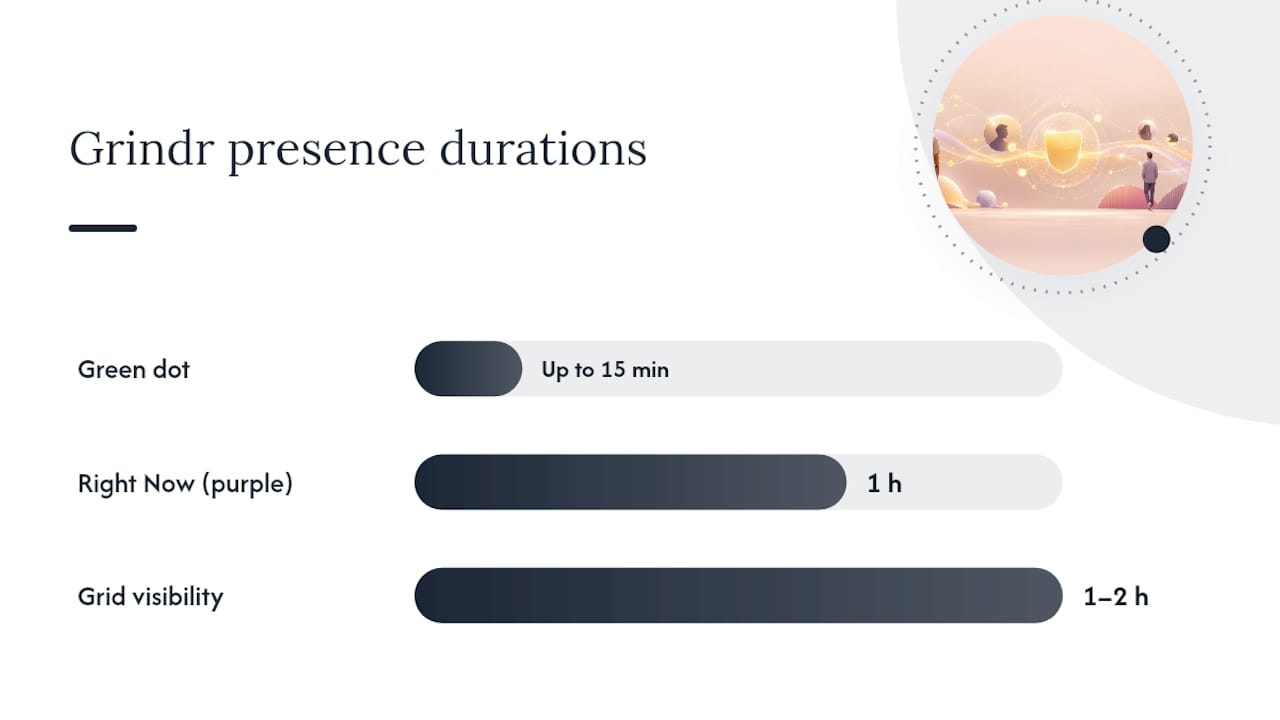
- Green dot = the app was recently opened; it can stay visible for up to 15 minutes after the app closes, per the Grindr Help Center
- “Last seen” / “minutes ago” = an approximation, not a real-time timestamp
- Grid visibility = a profile can stay on the grid for 1–2 hours after the app closes, even with no green dot
- Purple droplet / Right Now label = a separate 1-hour session feature, not the same as the green dot
- Profile view count = Grindr does not show this to other users
Pro Tip: Close the Grindr app on your own phone and ask a friend to check your profile. The green dot should disappear within 15 minutes. If it doesn’t, your app may still be running in the background.
One hard warning before you go further: installing spyware, using tracking apps, or reading someone’s private messages without their consent is illegal. It can get you prosecuted, not them. Keep reading for what you can do instead.
Key Takeaways
Grindr’s green dot is a rough activity signal that can persist up to 15 minutes after the app closes, and a profile can stay on the grid for 1–2 hours, making the indicator an unreliable basis for any relationship decision.
| Point | Details |
|---|---|
| Green dot timing | Persists up to 15 minutes after app close; not a live confirmation of active use. |
| Grid visibility window | Your profile can remain visible on the grid for 1–2 hours after closing the app. |
| Right Now is separate | The purple droplet marks a deliberate 1-hour session, distinct from the passive green dot. |
| Testing a block | Search from a second account; if the profile appears there but not yours, you’ve been blocked. |
| A better alternative | CheaterDetectorAI scans public dating profiles anonymously with no phone access required. |
How does Grindr show your last seen and online status?
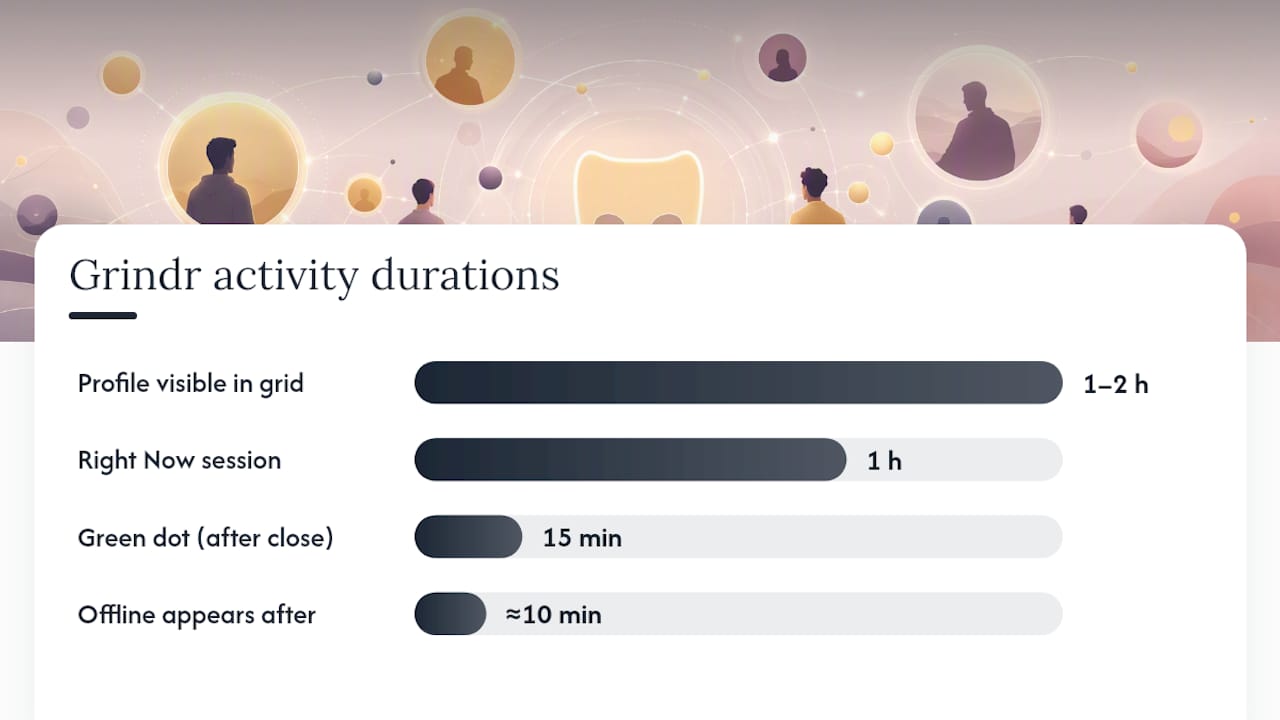
The green dot is Grindr’s primary activity signal. It appears on your profile the moment you open the app. According to the Grindr Help Center, it can persist for up to 15 minutes after you close the app entirely. After that window, Grindr switches to an approximate “minutes ago” or “last seen” label.
Your profile doesn’t vanish from the grid the second you close the app, either. It can remain visible to nearby users for roughly 1–2 hours. That’s a detail most people miss, and it’s the single biggest reason the green dot feels misleading.
What each indicator actually signals:
- Green dot = app was opened recently; does not confirm the person is actively browsing or messaging
- “X minutes ago” = Grindr’s estimate of when the app was last active; not a precise clock
- “Offline” = the app has been closed long enough that Grindr stops showing a time estimate; community reports show this can happen after roughly 10 minutes of inactivity
- Purple droplet + Right Now label = the user joined a Right Now session, a separate 1-hour feature that places profiles in a live feed and map; it’s distinct from the standard green dot
- No profile view count = Grindr does not show users how many times their profile was viewed
Pro Tip: Tapping and holding a push notification does NOT update your online status. But using Quick Reply or opening the app fully does — it behaves exactly like a fresh app open and resets the green dot timer.
Right Now sessions are worth understanding separately. When someone joins Right Now, they get a purple droplet icon and appear in a dedicated feed for exactly one hour. That’s a deliberate, active choice to be visible — different from the passive green dot that can linger after someone simply forgot to close the app.
How to reduce or hide your Grindr presence right now
You can limit how visible you are, but you can’t erase every trace instantly. Here’s what each step actually changes, in order of impact.
Step-by-step actions:
- Turn off Right Now. If you’re in an active Right Now session, end it. This removes the purple droplet and pulls your profile from the Right Now feed immediately.
- Enable Incognito Mode (Xtra/Unlimited subscribers). Incognito hides your profile from the main grid. Users who haven’t tapped your profile first won’t see you at all.
- Close the app completely. Force-close it — don’t just minimize. The green dot disappears within 15 minutes. Your profile may stay on the grid for up to 1–2 hours, but the active signal goes dark.
- Restrict app permissions. On iOS, go to Settings → Grindr → Background App Refresh and turn it off. On Android, go to Settings → Apps → Grindr → Battery → Restrict. This stops the app from pinging in the background and updating your status passively.
- Block specific users. Blocking removes your profile from that person’s grid entirely. They can’t see your status, your dot, or your distance.
- Delete your account. This removes your profile from the grid and all searches. Note: it does not immediately scrub cached data from other users’ devices, and it is permanent.
What each step actually changes:
| Action | What it hides | What it doesn’t hide |
|---|---|---|
| End Right Now session | Purple droplet, Right Now feed | Standard green dot |
| Incognito Mode | Grid presence for non-contacts | Profiles you’ve already messaged |
| Force-close app | Green dot (after ~15 min) | Grid visibility (up to 2 hours) |
| Restrict background refresh | Passive status updates | Active-open status |
| Block a user | Everything from that user | Your profile for all others |
| Delete account | All grid presence | Cached data on others’ devices |
Important: Installing spyware, using a tracking app, or accessing someone’s phone or messages without their permission is a federal crime under the Computer Fraud and Abuse Act. It can come back on you hard, even if you suspect your partner of cheating. There is no gray area here.
Pro Tip: Before running any visibility test, check the Grindr status page to confirm the app is fully operational. A platform outage can make profiles appear offline or missing even when users are active.
How can you tell if someone blocked you or just went offline?
Blocking usually removes a profile from your grid entirely. A “last seen a while ago” label, on the other hand, almost always means inactivity, not a block. Here’s how to tell the difference quickly.
Quick checks you can run in 5–10 minutes:
- Search from a second account. If the profile appears on a fresh account but not yours, you’ve been blocked. If it’s gone from both, the account may be deleted or temporarily suspended.
- Check your chat history. After a block, the conversation thread usually remains in your inbox, but you can’t send new messages. The message field may gray out or show an error.
- Try sending a message. If it fails to deliver or shows a persistent error, a block is likely. If it shows “delivered” with no response, they’re simply not replying.
- Look for the profile disappearing completely. A deleted account vanishes from search and from your chat list. A blocked account stays in your chat history but disappears from the grid.
- Watch for display glitches. Third-party apps that modify Grindr’s interface can cause profile display errors that mimic a block. Uninstall any such apps before drawing conclusions.
Edge cases matter here. Grindr occasionally shows temporary display errors where profiles vanish from the grid without any block or deletion. If a profile you’ve been chatting with suddenly disappears, wait 30 minutes and check again before assuming the worst. Account deletions are permanent and immediate; glitches are usually short-lived.
What Grindr’s green dot and last seen do NOT tell you
The green dot does not prove your partner is messaging someone. It doesn’t show who they’re talking to, where they physically are, or whether they even looked at the app intentionally.
Common false assumptions — and the reality:
- “Green dot = they’re actively messaging someone” — False. The dot persists for up to 15 minutes after the app closes. They may have opened it briefly and put the phone down.
- “Last seen 2 minutes ago = they just read my message” — False. Grindr’s timestamp reflects app activity, not message-read status. There is no read receipt system.
- “They’re on the grid = they’re actively browsing” — False. Grid presence can last 1–2 hours after closing the app, per Grindr’s own Help Center documentation.
- “No green dot = they’re definitely not on Grindr” — False. They may have Incognito Mode enabled, or the indicator may have simply timed out.
- “I can see their distance = I know where they are” — False. Distance is approximate and based on the last known location Grindr recorded, not their real-time position.
- “The app shows who viewed my profile” — False. Grindr does not provide profile view counts to any user.
Community feedback on Grindr’s UserVoice forum shows that the status labels themselves have shifted over time, with some users seeing a flat “offline” label instead of a “last active X minutes ago” timestamp. That inconsistency alone should tell you how much weight to put on these signals.
Pro Tip: If you’re checking someone’s status repeatedly throughout the day, stop. Obsessive monitoring based on an imprecise indicator causes real emotional harm — to you. A green dot is not evidence of anything specific. If you need actual answers, there are better ways to get them.
Quick fixes when the online indicator seems wrong
Check your connection, your app version, and the Grindr status page before you assume a display problem means something about another user.
Step-by-step troubleshooting:
- Force-close and reopen the app. This clears cached display data and forces a fresh status pull from Grindr’s servers.
- Log out and log back in. A full session reset often corrects stale status indicators that didn’t refresh properly.
- Check the Grindr status page. It lists component health for the Grid, Chat, iOS app, and Android app separately. If any component shows degraded performance, that’s your answer.
- Check Downdetector. It aggregates real-time user reports and shows whether others are experiencing the same issue. A spike in reports confirms a platform-wide problem, not a personal device issue.
- Check IsDown. A secondary outage monitor that tracks incidents and component status; useful when Downdetector’s data is thin.
- Update the app. Check Google Play or the App Store for pending updates. An outdated app version can cause status display bugs that a fresh install fixes.
If the status page shows a platform-wide incident, wait for Grindr to resolve it before running any visibility tests. Testing during an outage gives you false results. Once the status page shows all components operational, repeat your test from scratch.
What experts say about indicator accuracy and safer options
Digital behavior experts treat the green dot as an approximation, not a fact. Background app behavior, network delays, and app refresh cycles all introduce lag between what a person actually does and what the indicator shows.
The core issue is that Grindr’s status system was built for convenience, not precision. An independent technical explainer notes that the green dot reflects detected app activity, not confirmed user attention. Someone’s phone could wake the app in the background, briefly ping the server, and trigger the green dot without the person ever touching the screen.
Experts consistently advise against using these indicators as the basis for relationship decisions. The signal is too noisy. Misreading it leads to accusations built on nothing, and that damage is hard to walk back.
Alternatives that actually give you answers:
- Run a discreet public-profile scan. Services like CheaterDetectorAI check publicly available dating profiles across major apps using only a name or email. No phone access. No spyware. Public data only.
- Search by username or email. A username search across dating sites can surface active profiles your partner may not know you can find.
- Document what you find publicly. Screenshots of public profiles, timestamps, and profile photos are admissible. Private messages taken from someone’s phone are not.
Pro Tip: If you find evidence through a public-profile scan, save screenshots with timestamps immediately. That’s the kind of documentation that holds up. Evidence from spyware or unauthorized phone access does not.
The cost of going the snooping route is real. Getting into someone’s phone or accounts without permission can result in criminal charges, regardless of what you find. The legal boundaries around online snooping are clear: public information is fair game; private accounts and messages are not.
A word from the editor
Doubt is exhausting. Watching a green dot appear and disappear while you try to read meaning into it is one of the more quietly painful things a relationship can put you through. You deserve a real answer, not a guessing game built on a 15-minute timer.
Don’t install spyware. Don’t go through their phone. Both paths can end with you in trouble while your actual question goes unanswered. Check their public profiles instead. Search their name now and find out what’s actually out there.
Cheater Detector AI: a private way to check public dating profiles
If the green dot has you worried, there’s a faster and safer path than staring at an indicator that can’t tell you what you actually need to know. CheaterDetectorAI scans publicly available dating profiles across all major apps, including Grindr, using just a name or email address. No phone access. No spyware. No contact with your partner.
What you get: profile matches with photos, activity timestamps, and an encrypted report delivered fast. The subscription model means you can also set up ongoing monitoring alerts, so you’re not left checking manually every day.
Check their profile today using the Deep Person Scan — enter a name and see what public profiles come back. If you want to go deeper, the anonymous partner scan is built specifically for this situation. Search their name now and get a clear answer instead of a green dot that means nothing on its own.
No guesswork. No snooping. Just public information, organized into a report you can actually use. Start a discreet scan right now.
Sources
Official pages and outage monitors to check when a status indicator seems wrong:
- Chatting with other profiles – Help Center
- Right Now — Help Center
- Users are shown as “offline”, not “last active xx minutes ago” — Grindr UserVoice
- Grindr Status
- Grindr down? Current problems and outages - Downdetector
FAQ
How do I know if someone is active on Grindr?
A green dot on their profile means the app was recently opened, but it can persist for up to 15 minutes after they close it. The most reliable signal is a green dot combined with a very recent “minutes ago” timestamp, though neither confirms they are actively browsing.
How do you know if someone hides you on Grindr?
Search for their profile from a second Grindr account. If their profile appears on the second account but not yours, they’ve likely blocked you. If it’s gone from both accounts, they may have deleted their profile entirely.
Does Grindr show how many times someone viewed your profile?
No. Grindr does not provide profile view counts to any user, regardless of subscription tier. Any third-party app claiming to show this information is not pulling it from Grindr’s official data.
Why does someone show as “offline” instead of “last active X minutes ago”?
Community reports on Grindr’s UserVoice forum show that after roughly 10 minutes of inactivity, the app sometimes displays a flat “offline” label rather than a timed “last active” stamp. This appears to be a platform behavior change, not a block or account deletion.
Can I check if my partner has a Grindr profile without touching their phone?
Yes. CheaterDetectorAI scans publicly available dating profiles, including on Grindr, using just a name or email address. The process requires no phone access and no spyware. A deep person scan returns profile matches, photos, and timestamps in an encrypted report.