%20scale(1.05)%20translate(-12,-14.25)'%3e%3cpath%20d='M12%2021s-7.5-4.7-7.5-10.2A4.3%204.3%200%200%201%2012%207.5a4.3%204.3%200%200%201%207.5%203.3C19.5%2016.3%2012%2021%2012%2021Z'%20fill='%23F0384A'%3e%3c/path%3e%3c/g%3e%3c/svg%3e)
You can use Facebook Dating without your friends or your partner automatically seeing your profile. Meta keeps Dating separate from your main timeline, and only your first name and age carry over from your regular account. But Meta still collects sensitive details like your gender preferences and religion, and those trade-offs matter. If you’re worried about a partner using Dating behind your back, the fix isn’t spyware. It’s knowing exactly what the app shows, what it hides, and what a public-profile check can tell you that snooping never will.
TL;DR:
- Facebook Dating profiles are only visible to other Dating users and are hidden from your Facebook friends list unless mutual interest is mutual through Secret Crush.
- The app collects sensitive data such as gender preferences, religion, location, and interests, which remains stored within Meta’s ecosystem even after deleting your profile.
- To improve privacy, disable extended network suggestions, review blocked contacts, and remove optional fields like religion or lifestyle details.
- Facebook Dating does not show activity status or last seen timestamps, making it impossible to confirm if someone is actively using the platform through built-in features.
- Using a remote public-profile scan can provide proof of a person’s presence on Dating without snooping or risking private data breaches.
Who Sees Your Facebook Dating Profile (And How Secret Crush Fits In)
Your worry probably sounds like this: “If she’s on Facebook Dating, will people we both know find out? Will I find out?” Here’s the honest answer. Facebook Dating profiles are visible only to other Dating users, not to your Facebook friends list, not to coworkers, not to anyone browsing your regular timeline. Meta built it this way on purpose, keeping the dating layer separate so people feel safe using it without their whole social circle watching.
That separation cuts both ways. It protects your partner’s privacy if they’re using Dating innocently, but it also means a partner who’s using it to cheat isn’t going to get outed by a mutual friend stumbling across the profile.
A few specific mechanics matter here:
- Friends are hidden by default. Your Dating profile won’t show up to people already on your Facebook friends list, even if they also use Dating.
- Secret Crush requires mutual opt-in. This feature lets you list up to nine Facebook friends you’re interested in romantically. Nothing happens unless that friend also lists you, at which point both of you get notified.
- Friends-of-friends suggestions can be switched off. Dating defaults to showing you potential matches from your extended network, but you can disable that entirely in settings.
- Blocked people stay blocked. If you’ve blocked someone on your main Facebook account, they’re automatically shut out of seeing your Dating profile too, according to Meta’s own Privacy Matters: Facebook Dating announcement.
So if you’re trying to figure out whether your partner’s secret profile would ever cross paths with your shared friends, the answer is almost never, unless a mutual friend also happens to be swiping and gets shown that profile as a suggestion.
What Facebook Dating Collects (And What Meta Says It Does With It)
Here’s where it gets more uncomfortable. When your partner sets up a Dating profile, Facebook only auto-imports two things: first name and age. Everything else, photos, bio, interests, gender, sexual orientation, religion, is something they type in themselves.
That “everything else” list is longer and more sensitive than most people realize. Dating asks for details that never show up on a regular Facebook profile:
- Gender identity and who they’re interested in dating
- Religious views (used as an optional matching filter)
- Height, relationship goals, and lifestyle answers
- Location data and device signals used to suggest nearby matches
- Group memberships and event activity, which Meta’s own ranking explainer confirms feeds into who gets matched with whom
Meta states that Dating information isn’t used to target ads, and that Dating is walled off from the advertising systems that run the rest of Facebook. That’s a real commitment, and it’s more than most dating apps state outright.
The catch privacy researchers keep pointing to: a Mozilla Foundation review of Facebook Dating flags the sheer breadth of what gets collected, profile answers, group activity, event RSVPs, location pings, as a bigger privacy surface than users expect from what feels like a small feature inside an app they already use. Even if that data doesn’t feed ads today, it still lives inside Meta’s ecosystem. Policies change. Data collected under one policy can outlast it.
Step-by-Step Privacy Controls You Should Change Right Now
If your worry is about your own exposure, or you just want to lock down your account before anything else, here’s the actual order to do it in:
- Turn off friends-of-friends matching. Open Dating settings, find “Match Preferences,” and disable suggestions from your extended network. This shrinks who can ever see you to strangers only, no mutual connections.
- Check your blocked list is synced. Anyone blocked on your main Facebook account is automatically blocked on Dating, per Meta’s safety policy, but confirm it manually if you’ve blocked someone recently.
- Unlink Instagram if it’s connected. Some users link Instagram photos to import them faster. Unlinking stops Dating from pulling fresh photos automatically.
- Remove sensitive fields you don’t need filled in. Religion, height, and detailed lifestyle answers are optional. Leave them blank if you don’t want them stored.
- Delete your Dating profile entirely if you’re done with it. This is separate from deactivating your main Facebook account. Go to Dating settings and choose delete profile, which removes your Dating data specifically.
Pro Tip: Deleting your Dating profile doesn’t delete your Facebook account, and deactivating Facebook doesn’t automatically delete Dating. They’re two separate switches. If you want to be fully off both, you have to disable each one separately.
Does Facebook Dating Show When Someone’s Active?
This is the question that brings most people here, and the honest answer will frustrate you: no, not really.
Unlike Messenger, which shows a green dot and a “last active” timestamp, Facebook Dating has no equivalent feature. There’s no live status indicator telling you when someone opened the app last, according to Facebook’s own guidance on how to tell if a dating profile is active. That’s a deliberate design choice, and it’s consistent with Facebook’s broader move to keep Dating’s activity signals separate from Messenger’s, which some privacy researchers note reduces the pressure users feel to respond instantly, according to background on Facebook’s privacy history.
What you’re left with instead are indirect clues, and they’re weak ones:
- A profile that suddenly has new photos or an updated bio suggests recent activity, but tells you nothing about timing.
- A quick reply to a message you sent (if you had a match) suggests they’re currently on the app, but a slow reply tells you nothing either way.
- Nothing in the app shows you a definitive “last seen” moment the way Messenger does.
If you’re trying to manually piece together whether your partner is actively using Dating, you’re working with fragments, not proof. That’s exactly why guessing from behavior rarely settles anything, and why so many people stay stuck in a loop of checking and re-checking without ever getting a real answer.
Privacy Gaps and What Privacy Experts Keep Warning About
Facebook Dating’s walled-off design is real, but it’s not the whole picture. The deeper concern isn’t what Dating shows other users. It’s what it feeds into Meta’s much larger data operation.
Even when Dating is siloed from your regular timeline, the core risk is what happens to the sensitive inputs you hand over, your sexual orientation, your religion, your relationship goals. That data doesn’t disappear once you close the app. It sits inside an ecosystem with a long history of policy changes, and privacy advocates argue that today’s “we won’t use this for ads” promise doesn’t guarantee tomorrow’s policy stays the same.
A few specific risk points worth understanding:
- Data persistence. Information you enter doesn’t vanish when you stop using Dating actively; deleting your profile is the only way to remove it.
- Third-party age verification. Some age checks route through outside vendors that briefly process a selfie or ID photo, an extra handling step most users never think about.
- Policy history. Meta has revised privacy commitments before. Nothing about Dating’s current “no ads” stance is written into unchangeable code, so it’s worth checking Meta’s help pages periodically for updates.
None of this means Dating is unsafe to use. It means the privacy protection is real but bounded, and understanding that boundary is the whole point of reading an article like this one instead of a marketing page.
A Private Way to Check: How Cheater Detector AI Works
If you’ve read this far, you already know the honest truth: Facebook Dating hides too much to give you real proof through manual checking alone. No active status, no last-seen timestamp, no guarantee a mutual friend would ever spot the profile. So what do you actually do when you suspect your partner is on there?
You don’t install spyware. You don’t guess. You use a method that sticks to public information and doesn’t require touching anyone’s phone.
There are services that run anonymous, encrypted scans across public dating profiles, checking whether your partner has an active presence on major platforms, using only basic details you already know, such as a name, an age range, and a location. Nothing about the process touches their device, their messages, or their private accounts. It only looks at what’s publicly visible on dating platforms themselves.
- The scan cross-references your partner’s basic details against active dating profiles.
- Reports come back with matched profile photos and activity timestamps when a match is found.
- The entire process is encrypted and anonymous, meaning your partner is never notified.
- Results come back fast, so you’re not left waiting and spiraling for days.
Pro Tip: A scan works best as a first step, not a last resort. If it comes back clean, you’ve saved yourself weeks of anxious guessing. If it doesn’t, you have something concrete to work from instead of a hunch.
This is the gap manual checking can’t close. You can’t see a green dot on Dating, you can’t confirm a “last active” time, and you can’t rely on a mutual friend to spot something Meta specifically designed to stay hidden. A legal, anonymous scan fills that gap without any snooping.
Staying Safe If You Suspect Your Partner
Here’s the part you need to hear clearly: installing spyware, using a tracking app, or reading your partner’s private messages without permission is illegal in most places, full stop. It doesn’t matter how justified you feel. Get caught doing it, and you could be the one in trouble, not your partner. Prosecutors have pursued spouses for exactly this, and “I just wanted answers” has never worked as an excuse.
So what’s actually safe to do?
- Use Facebook Dating’s own settings and blocked list, which you’re fully entitled to check on your own account.
- Use a legal verification service that only scans publicly available information.
- Don’t take any step that involves someone else’s device or accounts, even if you think you have a good reason.
- Document what you already know honestly, dates, screenshots of public profiles, conversations, without ever getting into private data.
- Protect your own accounts too. If a relationship is falling apart, your own privacy matters just as much.
Curiosity is normal. Snooping isn’t worth what it can cost you. There’s always a cleaner way to get your answer.
How Facebook Dating Handles Encryption and Storage
Facebook Dating data is stored within Meta’s broader infrastructure, using standard encryption for data in transit, meaning information moving between your phone and Meta’s servers is scrambled so outsiders can’t intercept it easily. Meta doesn’t publish a granular, feature-by-feature breakdown of exactly how Dating data is encrypted at rest compared to your main profile data, which is itself a reasonable thing to want more transparency about.
What Meta has stated clearly is that Dating profile information stays logically separate from your main Facebook profile, meaning it’s not merged into the same visible dataset that friends or advertisers on the main platform can access. That separation is a privacy safeguard, but it’s an internal, policy-level wall, not something you can independently verify from outside the company.
If you delete your Dating profile, Meta states the associated Dating-specific data tied to that profile gets removed. That’s meaningfully different from deactivating your entire Facebook account, which does not automatically remove Dating data. If storage and deletion specifics matter to you, the most reliable source is Meta’s own Help Center rather than third-party summaries, since encryption and retention practices can shift with policy updates.
Who Gets Your Dating Data: Third Parties and Advertisers
Meta states plainly that Facebook Dating information is not used to serve you ads. Dating operates on a separate track from the ad targeting systems that power the rest of Facebook and Instagram, which is a meaningful commitment given how much of Meta’s business runs on advertising.
That said, “not used for ads” isn’t the same as “never touched by anyone outside the Dating feature.” A few third-party touchpoints exist:
Age verification checks sometimes route through outside vendors who briefly process identity or selfie data to confirm you meet the minimum age requirement. That data is meant to be handled temporarily, but it still means a third party outside Meta’s core team interacts with a piece of your information.
Meta’s ranking systems, the process that decides who gets suggested as a match, pull in signals from groups you belong to and events you’ve shown interest in on your main Facebook account, according to Meta’s Dating ranking documentation. Those signals stay inside Meta’s systems, not shared externally, but it shows how thoroughly connected Dating is to your broader Facebook activity, even while your visible profile stays separate.
Reviewing the Permissions You’ve Given the Dating App
If you’ve had a Dating profile active for a while, there’s a good chance you’ve forgotten what permissions you granted when you first set it up. It’s worth a five-minute audit.
Head into your Facebook Dating settings and check three things specifically. First, look at your match preferences, age range, distance, gender preferences, since these directly control who sees you and who you get shown. Second, review whether location access is still active; Dating uses this to suggest nearby matches, and you can restrict how precise that location sharing is. Third, check whether Instagram is still linked, since that connection pulls fresh photos into your Dating profile automatically until you disconnect it.
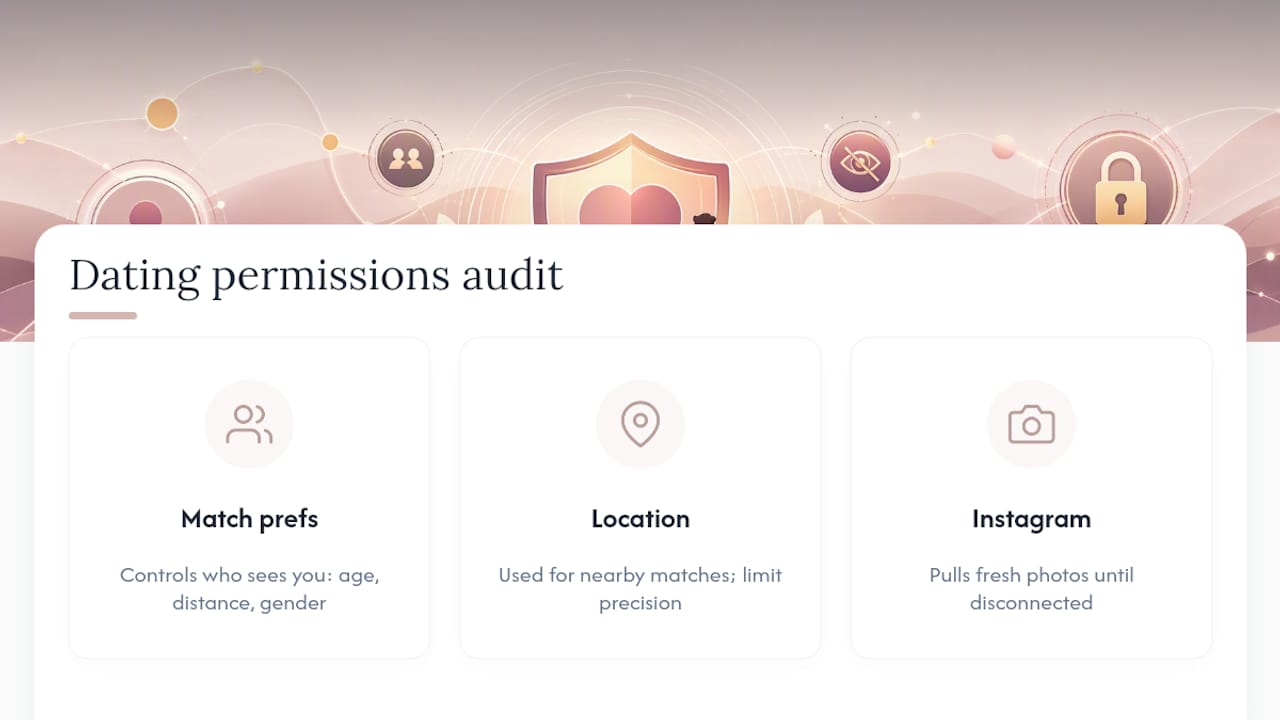
If you initially connected Dating to run more broadly than you’d like, tightening these settings takes a few minutes and immediately reduces what the app has access to going forward. None of this requires technical knowledge. It’s the same kind of settings review you’d do on any app that’s been sitting on your phone collecting information quietly for months.
How Facebook Fights Fake Profiles and Scams
Fake profiles are a real problem on any dating platform, and Meta has built specific protections into Dating to catch them. The Facebook Dating Safety Policy outlines several built-in defenses: blocking and reporting tools available directly inside a match’s profile, restrictions that prevent people from sending photos or links in Dating messages until certain trust conditions are met, and age verification steps meant to keep the platform’s minimum age requirement enforced.
These protections matter for privacy specifically because a fake profile isn’t just a nuisance. It’s a vector for someone to extract personal information from you under false pretenses. Restricting links and photos in early messages cuts down on common scam tactics like sending phishing links disguised as photos.
Facebook Dating also gives you optional Messenger location-sharing for in-person meetups, letting you share your live location temporarily with someone you trust while meeting a match, a safety layer aimed at the real-world risk of meeting a stranger from an app. None of these measures make Dating scam-proof, but they meaningfully reduce the easiest ways a bad actor could exploit the platform.
How Meta’s Broader Data Policies Touch Your Dating Privacy
Facebook Dating doesn’t exist in a vacuum. It runs inside a company that has faced real scrutiny over data handling practices across its entire platform, and that history shapes how much trust you should place in any single feature’s privacy promises.
The practical impact is this: Dating’s privacy protections are as strong as Meta’s current policies choose to make them, and those policies have shifted before. If Meta changes its data-sharing rules company-wide, Dating isn’t guaranteed permanent immunity from that shift just because it’s marketed as separate today. Privacy advocates who track Meta’s history point to this pattern as a reason to stay informed rather than assume today’s rules are permanent.
The practical takeaway isn’t to avoid Dating entirely. It’s to periodically check Meta’s actual policy pages rather than relying on marketing language from years ago, and to keep your own sensitive inputs, religion, sexual orientation, precise location, as minimal as you’re comfortable with, regardless of what today’s policy promises about how that data gets used.
Official Meta Pages and Quick Links
For the primary sources behind everything covered here, go straight to Meta’s own pages rather than secondhand summaries:
- Meta’s Privacy Matters: Facebook Dating blog post, the company’s own explanation of Dating’s privacy design.
- The Facebook Dating Safety Policy in the Help Center, covering blocking, reporting, and message restrictions.
- Meta’s ranking transparency page explaining how matches get suggested.
- If you need answers about your own situation rather than the platform’s policies, Cheater Detector AI’s deep person scan is the no-snooping option that starts with information you already have.
Where the Real Risk Actually Sits
Most advice about Facebook Dating privacy focuses on the wrong worry. People obsess over whether a friend will accidentally see their profile, when the friends-of-friends toggle solves that in about ten seconds. The bigger, quieter risk is what happens to the sensitive fields you fill in voluntarily, religion, sexual orientation, relationship goals, once they’re sitting inside Meta’s systems long after you’ve stopped thinking about them.
Manual detective work is where I see people waste the most energy. Checking for a green dot that doesn’t exist, refreshing a profile hoping for a timestamp Meta deliberately doesn’t show you, reading into a slow reply that means nothing. None of it gets you closer to an answer, and some of it, reading messages, installing tracking software, gets you into actual trouble that has nothing to do with your partner’s behavior and everything to do with yours.
Prioritize this order: lock down your own settings first, understand exactly what Dating does and doesn’t reveal second, and if you still need proof, use a method that sticks to public information. That’s the only sequence that protects both your relationship and your own position.
— Oleg
Sources
- Privacy Matters: Facebook Dating - About Meta
- Facebook Dating Safety Policy | Facebook Help Center
- Explaining ranking: Facebook Dating - Meta Transparency Center
FAQ
Can other people see that you’re on Facebook Dating?
Only other Facebook Dating users can see your Dating profile. It never appears on your regular Facebook timeline or to your friends list by default.
Can you control who sees you on Facebook Dating?
Yes. You can turn off friends-of-friends matching, and anyone you’ve blocked on your main Facebook account is automatically blocked from seeing your Dating profile, according to Meta’s own privacy explanation.
Can I be on Facebook Dating without my friends knowing?
Yes. Dating is separate from your main profile, and friends are hidden from your Dating profile by default unless you specifically use the Secret Crush feature to reveal interest, which requires mutual opt-in.
Can I hide myself on Facebook Dating?
You can limit visibility through match preferences and blocking, and you can delete your Dating profile entirely at any time, which removes it from view completely while keeping your main Facebook account untouched.
Does Facebook Dating show when someone was last active?
No. Unlike Messenger, Dating has no green dot or “last active” timestamp, according to Facebook’s own guidance, which is exactly why manual checking rarely gives a clear answer.