%20scale(1.05)%20translate(-12,-14.25)'%3e%3cpath%20d='M12%2021s-7.5-4.7-7.5-10.2A4.3%204.3%200%200%201%2012%207.5a4.3%204.3%200%200%201%207.5%203.3C19.5%2016.3%2012%2021%2012%2021Z'%20fill='%23F0384A'%3e%3c/path%3e%3c/g%3e%3c/svg%3e)
You saw something. Maybe a friend mentioned a profile that was “3,000 miles away.” Maybe your partner has a trip coming up and your stomach flipped. Now you’re asking if Tinder’s travel mode is a harmless trick or a cover story.
Here is the straight answer. Tinder’s travel mode is a paid feature called Passport. It lets someone swipe and chat as if they were in another city. Plenty of people use it for real trips. But it also lets a person start talking to strangers without anyone nearby seeing them. If your gut says something is off, don’t guess. Check their profile today.
TL;DR
- “Travel mode” on Tinder is Passport. It moves a person’s swiping to any city they pick, so they can match with people far from home.
- It is a paid feature, so a partner using it has chosen to spend money on it.
- Passport alone proves nothing. A real trip is a normal reason. A trip that never happens is not.
- A profile that appears far away may be hiding a person who is right next to you.
- The only way to know if a profile exists is to look for it. Search their name now.
What Tinder’s travel mode really is
Tinder calls it Passport Mode. Most people just say travel mode. According to Tinder’s help page, you can search by city or drop a pin on a map. Then you connect with people in that city.
You don’t have to be there. You can sit on your couch in Ohio and swipe in Lisbon.
Tinder says the feature comes with its paid plans (Plus, Gold and Platinum) and can also be bought on its own. So nobody stumbles into this by accident. Someone had to decide to pay for it.
How someone turns it on
The steps are short, which is part of why this worries people:
- Open Tinder.
- Tap the profile icon.
- Tap Settings.
- Tap Location.
- Add a new location.
That’s it. Per Tinder’s own instructions, they can be in one city at a time, but they can change as often as they like. Ten seconds. No trip needed.
The 24-hour detail
Tinder also says people you liked while using Passport may still see your profile for up to 24 hours after you change location. So a quick switch back doesn’t erase the trail right away.
Good reasons people use it
Be fair to your partner for a minute. We would want you to be.
There are normal reasons to use travel mode:
- They are flying somewhere and want to meet locals or other travelers.
- They are moving to a new city and want to look around first.
- They are single and planning a trip.
Tinder’s own solo traveler guide talks about matching with locals or fellow travelers before a flight even takes off. That is how the feature was sold.
Now ask the harder question. Is your partner single? Is your partner moving? If the answer to both is no, why would a person in a relationship want to talk to people in another city?
Why travel mode can be the perfect hiding place
This is the part that keeps people up at night.
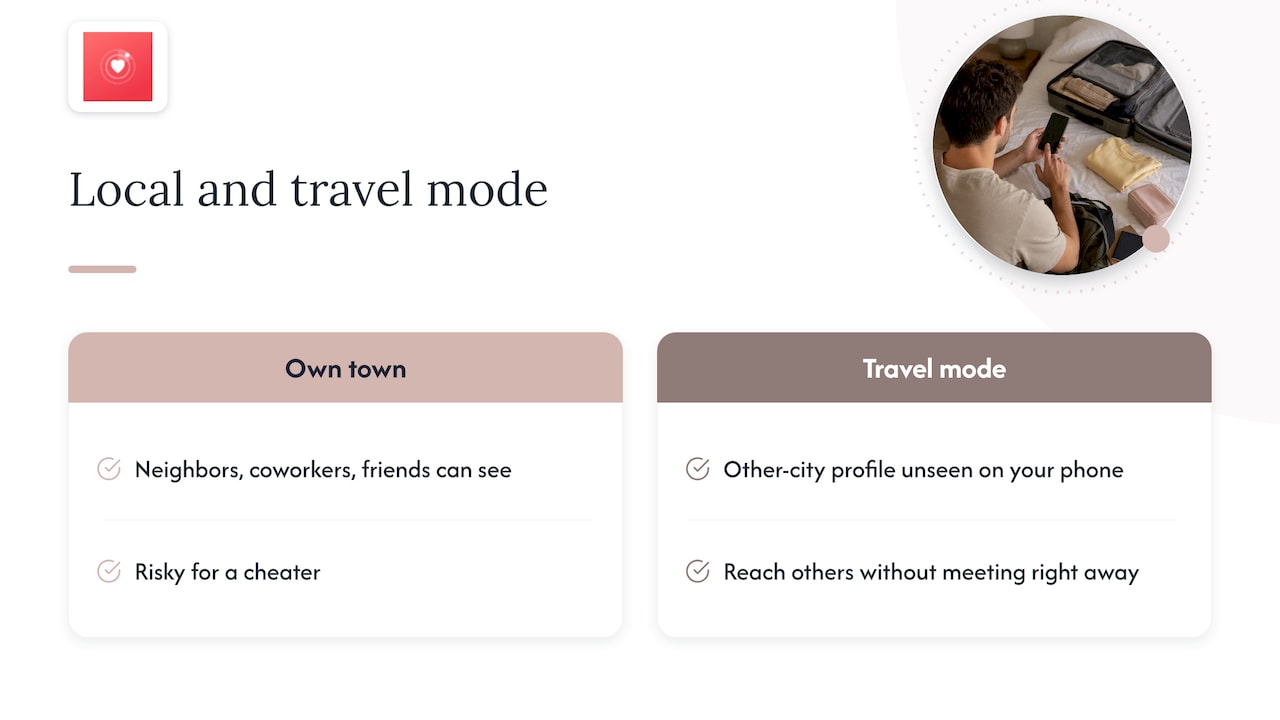
When someone swipes in their own town, neighbors, coworkers and friends can see them. That is risky for a cheater. Travel mode fixes that. Dating experts quoted by one Tinder guide describe it as a way to reach out to others without the risk of meeting right away.
Think about what that means. Your partner could chat all night, in the next room, with someone who is “far away.” It feels safe to them. It feels harmless. It is not harmless to you.
And a profile in another city is a profile you will never see on your own phone. You can swipe all day in your own town and never find it.
Does that make you feel calm? Or does it make you want to know?
Signs it might be more than a trip
None of these is proof alone. Together, they matter.
1. There is no trip
Your partner has no flight, no hotel, no work travel. But a friend says the profile is thousands of miles away. That gap is worth a question.
2. The bio talks about visiting
People who show up far from home get treated like scammers. One guide explains this “tourist stigma”: matches suspect a bot or scam when the distance is huge. So people often add a line like “here for the weekend.” A bio like that means someone is working hard to look real. Ask yourself why.
3. The distance is missing
Tinder normally shows how far away someone is. The same guide says that when the real location is far away, the distance reads in the thousands of miles. It adds that a missing distance can look like a red flag to others. Hidden distance plus hidden activity is a pattern.
4. Your partner guards the phone
New passcode. Phone face down. Screen flipped when you walk in. Notifications turned off. This one is not about Tinder at all. It is about trust.
5. The story keeps changing
First it was “just curious.” Then “a friend set it up.” Then “I deleted it ages ago.” Stories that move around deserve a closer look.
6. Odd timing
Late-night screen time. Long bathroom visits. A burst of activity right after a fight. You know your partner’s normal. You feel it when it changes.
What the distance on a profile can and can’t tell you
Here is something many worried people get wrong. A number on a profile is not a full answer.
Some people think a fake location is easy to spot. Others think a VPN hides everything. The truth is messier. One review of location tricks says Tinder looks at signals like IP address and device movement to catch free GPS-faking apps. If it catches someone, the account can be shadowbanned. That means the person can still see their own profile, but others can’t.
What does that mean for you?
- A profile can be real and still show the wrong place.
- A profile can exist and be quiet, because it was hit with a ban.
- A profile can be hidden from you in your area but live somewhere else.
If you want to dig deeper into what distance really shows, read our guide on what that Tinder distance really proves.
The point is simple. You can’t settle this by squinting at a number. You need to find the profile itself.
A quick comparison: ways people try to find out
| What you try | What goes wrong |
|---|---|
| Ask your partner directly | You may get a denial. Now they know you are checking. |
| Make your own Tinder account and swipe | You only see people near your location. Travel mode sends them elsewhere. |
| Look at their phone | Risky, tense, and often a fight. |
| Ask friends to look | Friends talk. Your worry becomes everyone’s gossip. |
| Run a private scan by name and photo | Quiet. No alert to your partner. You get a report. |
Notice the pattern. Most of these options put you in the middle of a fight before you even have answers. The last one doesn’t.
Our view: why “just a trip” is rarely the whole story
We talk to worried partners every day. Here is what we see.
Most people who reach us are not looking for drama. They are tired. They have a knot in the stomach and a feeling they can’t shake. They have already asked, and the answer didn’t land.
Travel mode shows up in these stories more than you might expect. It is cheap, it is simple, and it moves a person out of sight. A partner using it doesn’t have to worry about a coworker spotting the profile. That is exactly what makes it attractive to someone who wants to keep a secret.
So here is our honest take. If a partner uses travel mode with no trip, no move, and no explanation, the doubt you feel is not silly. It is information. Your doubt is asking for a real answer, and “don’t worry about it” is not an answer.
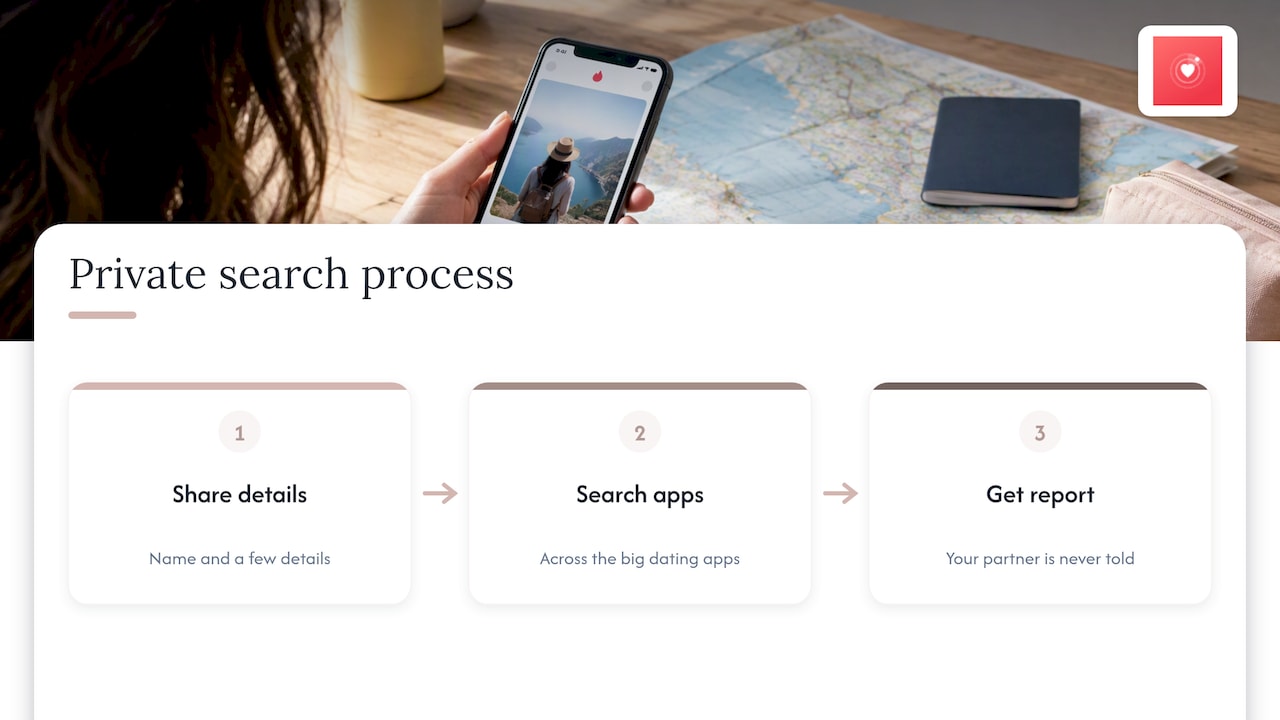
We built our service so you can get that answer without a confrontation, without swiping, and without making an account. You give us a name and a few details. We look across the big dating apps and report back. Your partner is never told.
You deserve to know what you are dealing with.
— Matt
What to do right now
You have three paths. Only one gives you facts.
Path 1: Do nothing
You keep wondering. The doubt grows. Every late text feels bigger than the last. This path costs you sleep.
Path 2: Confront first
You say “are you on Tinder?” Your partner says no. If a profile exists, it can vanish before you see it. You’re left with a denial and no proof.
Path 3: Look first, talk second
You find out quietly. Then you decide what to say, with real information in your hands. This is the one that protects you.
If you pick the third path, here is how to start:
- Write down their full name, age range and the city they live in.
- Find one or two clear photos of them.
- Run a private check. Start your Tinder profile search.
- Read the report calmly. Look at the photos and the activity times.
- Decide what you will say, and when.
Want to learn more first? These short reads explain how people look without an account:
- How to look up Tinder profiles discreetly
- Search Tinder by name: privacy-first checks
- See Tinder without an account
- Check if someone has Tinder
Don’t stop at Tinder
Here is a trap. You check Tinder, find nothing, and relax. But Tinder is only one app.
People who want to hide often use more than one. A partner who moves location on one app may be on Bumble, Hinge, OkCupid or Plenty of Fish too. If you only look in one place, you only get a piece of the picture.
That is why we scan across the major apps at once. One name. One quiet check. One report.
A profile photo can also change between apps. A new haircut, a different angle, a cropped picture. Searching by face as well as by name helps catch what a name search misses. See how that works with our reverse-image dating search.
Ready to stop wondering?
Cheater Detector AI is built for one thing: helping you find out if your partner is secretly active on dating apps. You enter a little information. We cross-check it against profiles on the major apps. You get a private, encrypted report with profile matches, photos and activity times. Your partner gets no notice. You don’t make an account on the apps and you don’t swipe.
Pick the check that fits your worry:
- Not sure which app? Run a Partner Check.
- Want the full picture? Order a Deep Person Scan.
- Only worried about Tinder? Use the Tinder Profile Search.
Don’t wait for another night of doubt. Start your scan now.
If you are the one meeting someone new
This article is mostly for worried partners. But some readers are single and using travel mode themselves, planning a date in a new city. If that’s you, it is smart to learn about the person before you meet. This guide on background check options before a first date walks through a few routes. Tell a friend where you’ll be, and meet in public first.
What if the profile is fake?
Sometimes a profile isn’t your partner at all. Someone copies photos and builds a fake account. Travel mode makes that easier to hide, because a far-off location looks normal for a “traveler.”
That is why the photos and the activity times in a report matter. They help you see if the profile truly looks like your partner, or if it only looks close. Our guide on how to spot fake dating profiles can help you read what you find.
And if a profile does match? Take a breath. Don’t send angry texts. Save what you found. Think about what you want: answers, an apology, space, or an exit. Then pick your moment.
FAQ
What does travel mode do on Tinder?
It lets a person pick any city and swipe there as if they lived in it. Tinder calls it Passport Mode. They can only be in one city at a time, but can switch as often as they like.
Does Tinder travel mode cost money?
Yes. Tinder says it comes with Tinder Plus, Gold and Platinum, and can also be bought alone. If your partner is using it, they paid for it or for a plan that includes it. Check Tinder’s help page for current details.
Can I tell if my partner is using Passport?
Sometimes. A profile may show a distance of thousands of miles while your partner is nearby, and the bio may mention a visit. But some users hide distance, so you can’t count on it. The surest step is to search for the profile itself.
Is using travel mode the same as cheating?
No. Many people use it for real trips. What matters is the context: is your partner single, traveling, or moving? If none apply and the secrecy is real, your doubt is fair. Look first, then talk.
Will my partner know if I search for their profile?
Not with our service. The scan is anonymous and encrypted, and your partner receives no notification. You don’t need a Tinder account or any swiping.
Sources
- Passport Mode, Tinder Help Center
- Tinder Passport Guide: Change Location & Match Globally
- How to Change Location on Tinder: Free, iPhone, Android & PC Methods
- A Solo Traveler’s Guide to Tinder Passport